Making Events Truly Open to Everyone
This case study tackles how online ticket booking can be more accessible to users, making events truly open to Everyone.
“What if nobody was ‘disabled’ by our design choices?” Instead of treating accessibility as a checkbox exercise, TicketGo made it its north star. The mission was to create an event booking platform where everyone — from tech-savvy teenagers to grandparents with ADHD — could book tickets without sweat.
Designing Accessible Experiences: A Look at TicketGo’s Approach
In today’s digital landscape, web accessibility should not just be an afterthought, but a fundamental aspect of inclusive design. The web should be universally accessible, ensuring that everyone, regardless of ability, can participate and engage. This article explores how the principles of accessibility were considered in the design of “TicketGo,” a hypothetical event booking platform.
Accessibility First: A Core Principle
The core idea is that disability is often a concept born from poor design choices. Instead of retrofitting accessibility, the goal should be to build technology with everyone in mind from the outset, minimizing the need for specialist tools.
Understanding User Needs: Personas and Scenarios
TicketGo’s design process began with a deep understanding of its diverse user base. Personas were created to represent users with physical, auditory, visual, and cognitive impairments. These personas weren’t just abstract profiles; they were brought to life through scenarios detailing how each individual would interact with the platform and how assistive technologies or accessibility guidelines could enhance their experience.
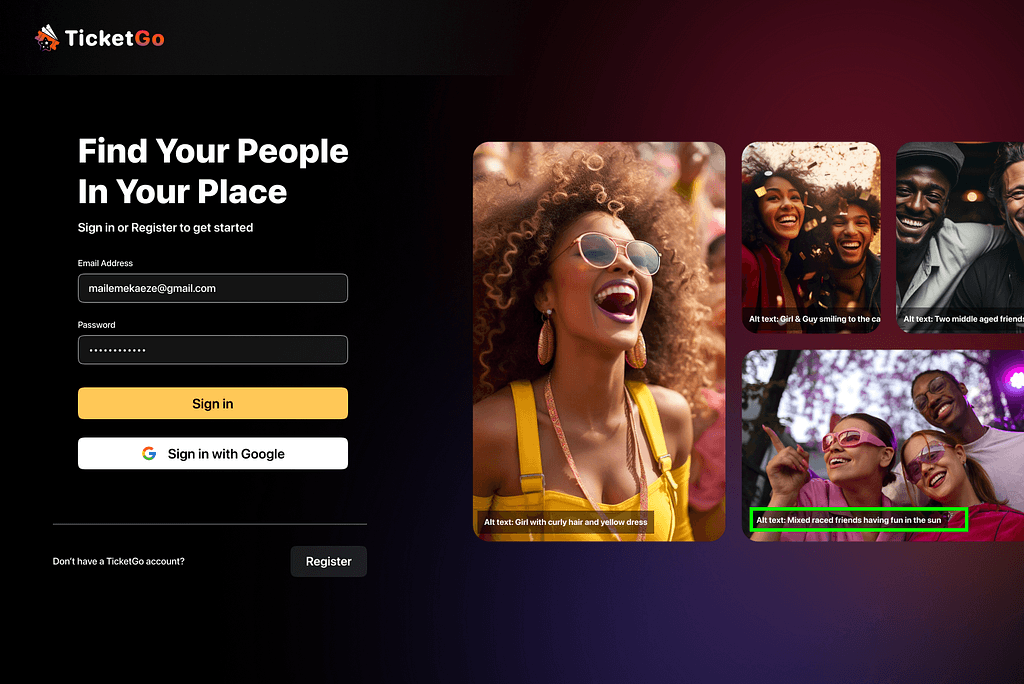
For instance, a persona with a visual impairment might use a screen reader to navigate the site. Scenarios would then explore how the site’s structure, alt text for images, and color contrast contribute to (or detract from) that user’s experience.


Web Content Accessibility Guidelines in Action: From Paper Prototypes to High-Fidelity Designs
Accessibility considerations were integrated from the earliest stages of design, starting with paper prototypes. These early sketches were annotated with relevant WCAG (Web Content Accessibility Guidelines) principles, ensuring that accessibility was a guiding factor in every design decision, making sure the platform adhered to the four core WCAG principles of being Perceivable, Operable, Understandable and Robust.


Overview of the overall design
As mentioned earlier, TicketGo’s design has strong emphasis on inclusive design principles and adherence to WCAG guidelines.
The platform features a dark mode design with intentional colour choices to meet WCAG contrast requirements. The home page displays upcoming and previous events, ticket purchase pages allow users to select ticket tiers and view event details. Additionally, logged-in users could instantly view upcoming and past events on the initial viewport, reducing cognitive load for such tasks.
The design of TicketGo evolved from initial sketches to a high-fidelity prototype. A “main categories” section was added beneath the search bar to group similar events, which improved information and relationships (WCAG 1.3.1). Additionally, event cards were redesigned to separate key details from the image to improve text clarity.


Applying WCAG Principles to High-Fidelity Designs
Physical Impairments: Ensuring sufficient target sizes for buttons and interactive elements, providing keyboard accessibility for all functions, and clear hover highlights.


Visual Impairments: Meeting minimum contrast ratios for text and non-text content, providing alternative text descriptions for images, and ensuring compatibility with screen readers.
Auditory Impairments: Providing captions and transcripts for audio and video content, and clearly indicating the language of the page.

Cognitive Impairments: Maintaining consistent navigation with a fixed top bar across all pages and screens, providing clear error identification and prevention mechanisms, and using simple, straightforward language.


Multi-Platform Accessibility
Recognizing the importance of mobile access, TicketGo also addressed accessibility on different devices:
Screen Size: Adapting the layout to different screen sizes, ensuring content remains accessible even on smaller screens.

Touchscreen Gestures: Making interactive elements easy to activate with touch gestures like swiping left, right, up or down.
Zoom/Magnification: Allowing users to zoom in and magnify content without loss of functionality.

Screen Orientation: Ensuring the site remains usable in both portrait and landscape orientations.

Innovative Approaches: Voice Control and Number Labeling
To further enhance accessibility, TicketGo explored innovative interaction methods like voice control:
- Voice Control Commands: Common actions, such as navigating to different sections of the website or purchasing tickets, can be performed using voice commands. This allows users with motor impairments to interact with the platform hands-free.
- Number Labeling of Elements: Interactive elements are assigned numerical labels, enabling users to select them using voice commands. For example, a user could say “Select button 3” to activate a specific button on the screen.

Evaluation and Iteration: User Feedback Drives Improvement
The design process didn’t end with the initial designs. Thorough user testing with individuals was conducted representing the target personas. They gathered feedback on the accessibility of the platform, identifying areas where improvements could be made. For example, initial testing showed that some users with cognitive impairments found adjusting ticket quantities confusing. To address this, the design was simplified by adding plus and minus buttons alongside a manual input option.

The Broader Impact: Beyond Compliance
While adhering to WCAG guidelines is essential, accessibility is more than just compliance. It’s about creating a more inclusive and equitable digital world where everyone has the opportunity to participate and thrive. By prioritizing accessibility, TicketGo not only benefits users with disabilities but also improves the user experience for everyone. Clear, well-structured websites are easier to use for all users, regardless of their abilities.
TicketGo’s journey highlights the transformative power of integrating accessibility into the design process from the outset. By understanding user needs, applying WCAG principles, and continuously testing and iterating, it’s possible to create digital experiences that are truly inclusive and accessible to all. Accessibility isn’t just a technical requirement; it’s a fundamental aspect of good design. It’s about creating products and services that are not only functional but also empowering, enabling everyone to participate fully in the digital world.